I have started learning Python after watching a great Netflix series “Inside Bill’s Brain: Decoding Bill Gates”. This series inspired me on start learning programming languages and create something new and (maybe) revolutionary. Sometimes, I was questioning myself: did I choose right degree program or not as I’ve realized that my heart is lying more into information technologies science. With this question in my mind I’ve decided to learn Python as it is considered ‘easy-to-learn’ language among the developers.
First thing what I’ve did is that I created my account on GitHub. GitHub is the online service, which provides their users with software development kits and hosting. Everything is controlled by Git: a system software (created by GitHub) created for tracking changes in the source code during software development.
Next thing, I’ve downloaded a book Swaroop C.H. “Byte of Python”. This book is absolutely free and can be downloaded from GitHub or read online via GitBook. The book itself is the combination of many different university courses, rewritten into a simple language, so everyone can understand what is going on in this book.
To code Python, I didn’t download anything. Instead, I went to the https://repl.it/ as it works as WYSIWYG for web-page development: what you see and code is what you get. However, it has one disadvantage, which I’ll mention later in this particular blog.
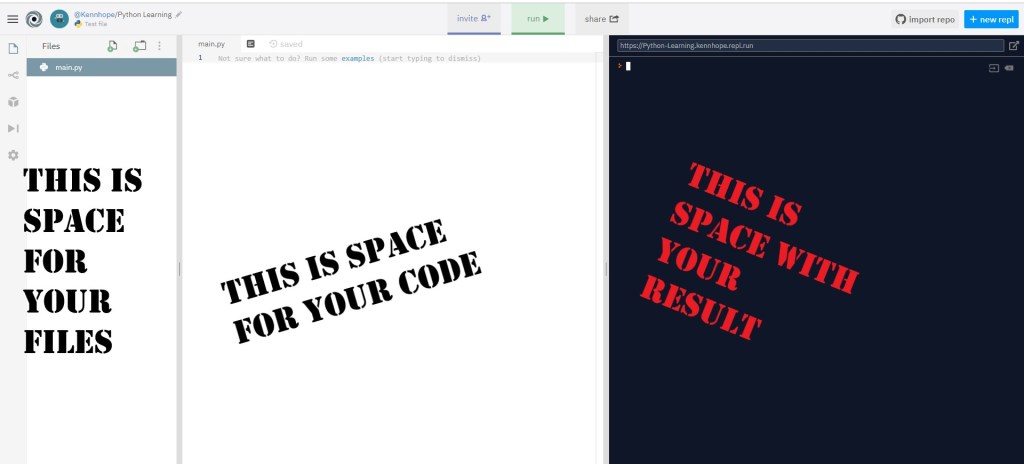
the base
First thing that I’ve learned is a simple command print. So the structure of this command looks like this:
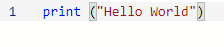
As you can see, to separate the command and the value for it, we put brackets. The text you want the computer to type we put in the quotation marks. When we finish writing this code, we hit the “run” button and see that the computer types Hello World due to the command, which we typed.
Every programming language should give their users ability to leave comments. Comments are very helpful for other users to understand the flow of ideas of another user. For example, in HTML we leave the comments by making this tag: <!– sample comment –>. In HTML editor, it will be colored differently from other tags. Here is an example:
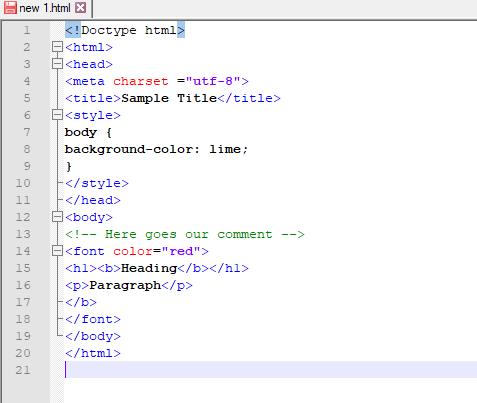
When it comes to Python, leaving comments is way too easy as you don’t have to type this long tag as in HTML. Instead, you simply put ‘# sample comment’. Your EDI should color your comment differently:

As you can see, there is no difference in where to put your comments (which is the same thing with HTML). You can put your comments wherever you like, just don’t make it messy and imagine as you are the user, who is not familiar with your code and trying to understand what is what.
format method
Formatting is always important for any type of file. When it comes to Python, ‘format method’ is simply your time savior. For example, imagine you are putting apples in your basket. It is not a big deal, unless there are thousands of them. Eventually, you will get tired of this. So what ‘format method’ in HTML does is that it saves you. Instead of grabbing “apple” again, and again, and again, and again, you can grab {a}. You can argue that “well, it’s not actually apple” and you will be right, unless we finish the format method by typing
a = ‘apple‘
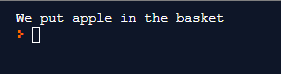
print (‘We put {a} in the basket’.format (a = a))
The outcome we will get is:
You can ask me “it’s very complicated. Why we have to write this format method when we can simply write “print (‘apple’)””. For this question I can answer that you won’t type this for the whole project as you will NEED to use some time-saving tools.
There are also different types of format method:

For this type of format method, you can see that the order is written as the numbers (from 0 to infinite) and the values for order is written in the brackets after .format.

If you don’t like putting numbers, you can leave {} brackets blank, then computer will understand that values should go by the order (from left to right).
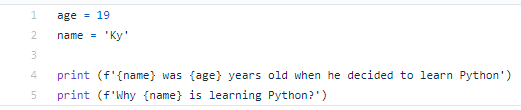
Here is my favorite: starting from the Python version 3.6, format method became easier. Instead of writing .format with values at the end, you simply put f before the sequence.
However, it has one disadvantage, which I’ll mention later in this particular blog
Me
And here is the disadvantage for the Repl.It: it doesn’t support Python 3.6 (or higher) codes. So this type of format method won’t work. Instead, if you need to test this method, you can use another IDE, such as https://ideone.com/
Here is one example, which I did, where you can use format method:

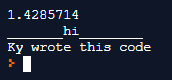
- Equation solved by using format method
- Text written with underscores by using format method
- Format method we used previously
Separation
The last thing for this blog, which I’d like to show you is how to separate each symbol in the text, so our text can “l o o k l i k e t h i s”.
To create the space after the symbol, we should write our code like this:
print (‘S’, end =’ ‘)
Note, that between quotation marks, we have to put space.
With this structure in mind, let’s type phrase “Separate me” separately. The code for our example will look like this:
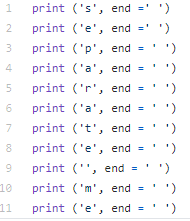
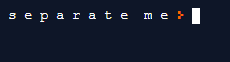
For your homework, try to play around with these codes (especially with format method!!) as it’s pretty fun feature and you can discover many interesting things.
Once again, here are all the links you need:
- https://repl.it/ – IDE
- https://ideone.com/ – IDE with newer Python
- https://github.com/swaroopch/byte-of-python/releases/tag/va62ee8caa3475e8733c40918bbe16719b4904693 – book, which I’m using to write this blog
 Kyrylo's Portfolio